Candidate moves & best continuations
Scores favor White when positive and Black when negative. M means a forced mate found by the engine. Search depths can differ while calculation is running.
Review a continuation
Explore this line without changing your game above.
Try an example position
Import a PGN game
Paste one completed game, then select any move to analyze that position.
Your game file is read in your browser; it is not uploaded.
Video Tutorial: Chess Calculator in Action
How to find the best chess move
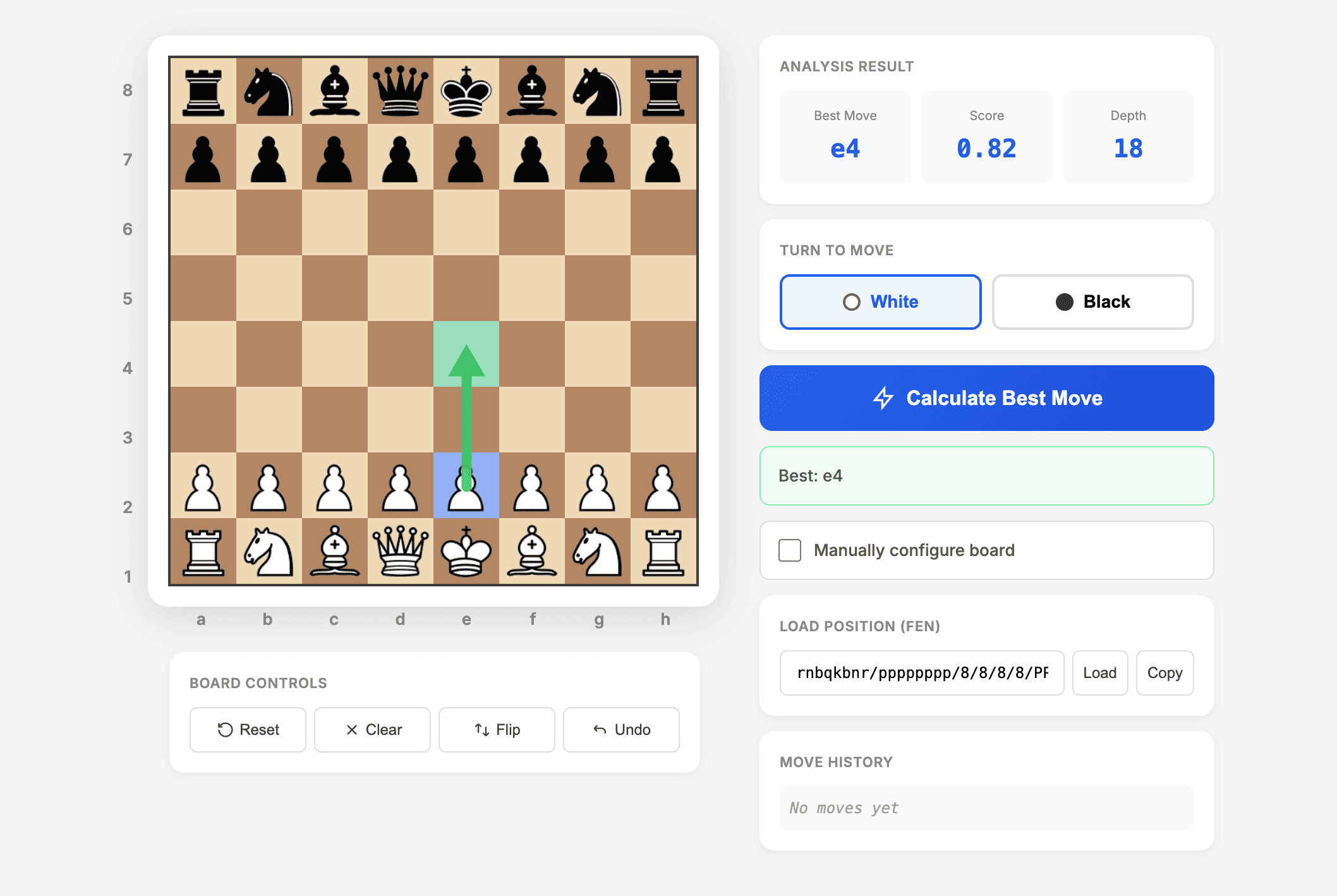
- Load your position. Play moves on the board, paste a FEN string, or enable manual setup to add and remove pieces.
- Check whose turn it is. White and Black can have very different best moves in the same arrangement.
- Calculate. The suggested move appears in algebraic notation. The score is shown from White's perspective; positive favors White and negative favors Black.
- Review the idea. Play the move and calculate the reply. Look for checks, captures, threats, and pieces left undefended.
Use the calculator for completed games, puzzles, and study. Need help copying a position? Read our FEN guide, or convert a PGN game into a FEN position.
Free Stockfish analysis in your browser
Stockfish searches legal continuations and evaluates the resulting positions. This calculator runs its engine in your browser, so analysis speed depends on your device and the position. A suggestion is the best move found within the search, not a proof that every alternative loses.
What the results mean
- Best move: standard algebraic notation, such as Nf3, Bxe5, or Qh4#.
- Score: an engine estimate in pawn units from White's perspective. +1.00 is an approximate advantage, not a guaranteed extra pawn or a win probability.
- Depth: the reported search depth in plies (half-moves). Select a target depth; a time limit keeps slower devices responsive.
- Mate: M3 means the engine found a forced mate in three moves for White; -M3 indicates a forced mate for Black.
For more detail, read our guide to depth, evaluation, and principal variation.
Chess calculator features
FEN position import
Load an exact board position, including the side to move and castling rights. Copy the current FEN to save your work.
Editable chessboard
Use manual setup to add pieces, drag them to new squares, or remove them. Choose castling rights only when they are still legal.
Move and reply analysis
Get a move in readable notation, play through a continuation, and compare the resulting evaluations.
Choose the right chess analysis tool
Analyze a single position or import a complete PGN game above. Use the move history to return to any position, compare candidate moves, and explore the replies on the separate continuation board. For notation conversion, open the PGN and notation converter.
Before looking at the engine's answer, write down two candidate moves and your opponent's strongest reply. Comparing your calculation with the result is more useful than memorizing a move without understanding it.
Try our game analysis workflow or the calculation checklist.
When to Use a Chess Calculator (Ethics & Learning)
Fair Play Notice: This chess calculator is designed for learning and post-game analysis, NOT for use during live games. Using chess engine assistance during competitive games is considered cheating and violates the rules of Chess.com, Lichess, FIDE, and all chess platforms. You risk permanent bans from online chess platforms.
Appropriate Uses for Chess Calculators:
- Analyzing your completed games to find the best chess moves you missed
- Solving chess puzzles and tactical exercises to improve pattern recognition
- Preparing opening variations before tournaments using chess engine analysis
- Studying famous historical chess games from Fischer, Kasparov, and Carlsen
- Training and improvement exercises focused on finding the next best move
- Chess homework and learning scenarios for educational purposes
Inappropriate Uses:
- During any live game (online or over-the-board)
- During chess tournaments of any kind
- In rated matches on any chess platform
The difference between learning and cheating is timing. Using a chess calculator for post-game analysis = learning and improvement. Using chess engine help to find your next move during a live game = cheating and unfair play. Use this chess solver tool to improve your chess skills through study, not to deceive opponents during competitive play.
Common Use Cases for Chess Calculators
Post-Game Analysis
Review your completed games to identify where you went wrong. Find the best chess moves you missed, analyze critical moments, and learn from your mistakes to improve your chess rating.
Chess Puzzle Solving
Stuck on a difficult chess puzzle? Use the chess calculator to verify solutions or understand the logic behind tactical combinations and find the next best move.
Opening Preparation
Test chess opening variations, find improvements in your repertoire, and analyze critical positions from your opening lines before important tournaments.
Endgame Study
Solve complex chess endgames, verify theoretical positions, and learn optimal techniques for converting winning advantages using precise engine calculations.
Historical Game Study
Analyze classic chess games from Fischer, Kasparov, Carlsen and other legends. Discover why grandmasters made certain chess moves and improve your understanding.
Position Evaluation
Settle debates about who's better in a given chess position with objective computer analysis. Find the next best chess move in controversial positions.
More Free Chess Tools
Explore our complete suite of free chess tools designed to help you improve your game.
Chess Move Calculator FAQ
How do I calculate the next best chess move?
Load a FEN position or set up the board, select the correct side to move, and press Calculate Best Move. Check the suggested reply by playing the move and analyzing again.
Is this chess move calculator free?
Yes. You can analyze positions without an account or subscription.
Can I import a complete PGN game?
Yes. Paste one PGN game or open a PGN file in the import box above. Click a move or use Previous and Next to review each position, then calculate its best continuations.
How deep does the engine analyze?
Choose a target depth of 12, 16, 18, or 20. Analysis also has a time limit so slower devices can finish. The displayed depth tells you how far that search actually reached.
Can I set up a custom chess position?
Yes. Enable manual setup to add or remove pieces. Both kings must be present. For exact castling rights and en passant information, use a complete FEN string.
Why does the answer change at a different depth?
A deeper search can discover a tactical defense or a stronger continuation. Engine evaluations are estimates that can change as more lines are searched.
Can I use this during an online game?
Use it for study and completed games. Follow your game or event rules; engine assistance is generally prohibited in competitive play.
Does the calculator work on a phone?
Yes. The board adapts to smaller screens. You can paste FEN instead of moving pieces manually, and choose a lower depth for a quicker result.
Improve Your Chess Knowledge
Chess Board Setup Guide
The correct way to set up pieces. Learn the "White on Right" rule and where the Queen goes.
Read Guide →Stalemate vs Checkmate
Understand the difference between a draw and a win. Learn the fastest checkmates (Fool's Mate).
Read Guide →Chess Notation Converter
Convert coordinate moves to algebraic notation or step through a PGN game.
Open Tool →Start Analyzing Your Chess Positions Now
Set up a position, find a candidate move, and test the reply. Free chess analysis for puzzles, completed games, and practice.
Launch Chess Calculator